
Credits System
AI Features /Credits SystemSign in with email, purchase credits, and use Corkulous AI without managing API keys.
Credits are the easiest way to use AI in Corkulous: no provider accounts, no API keys. Buy credits once and spend them on board generation, images, audio narration, and music. Your balance, purchase history, and usage history belong to your Credits account. App subscriptions, Credits purchases, and provider API billing are separate; a subscription or lifetime license does not provide unlimited AI usage.
Data sent to providers: AI can send your prompt, included board/conversation content, attachments, and enabled tool requests to external services. Those services may retain inputs, outputs, and technical records under their applicable policies and API terms. Review the provider privacy and data-use links before sharing sensitive information. Deleting content in Corkulous does not automatically erase copies held by those services.
Sign In to Your Credits Account
Credits mode uses an email-based account.
- Open Corkulous and choose Credits as your AI mode.
- If you are not signed in yet, Corkulous shows the AI Credits sign-in screen.
- Enter your email address and request a magic link.
- Open the latest email and tap the sign-in link.
- The link opens a secure web page and then returns you to Corkulous to complete sign-in.
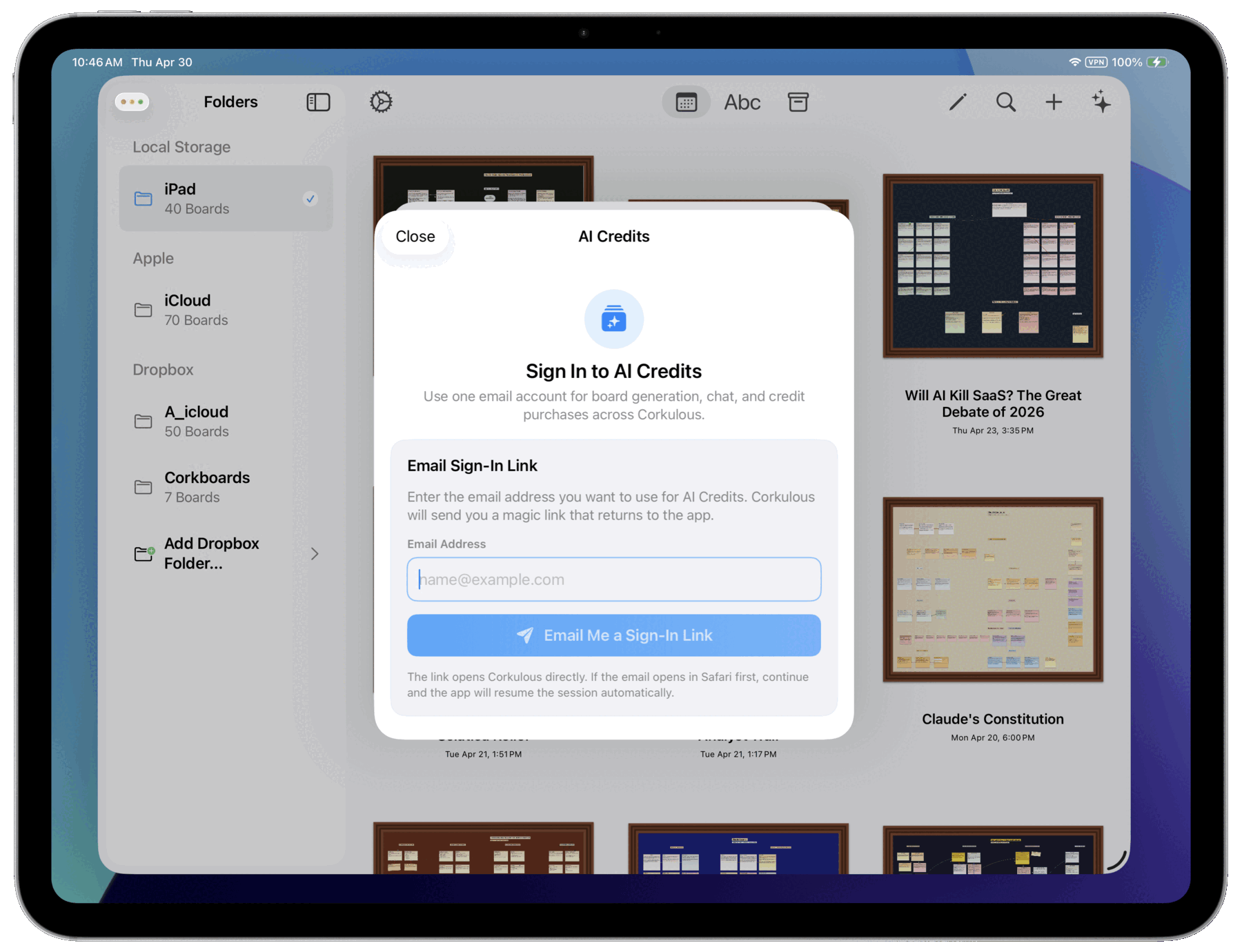
This gives you a server-backed Credits account with:
- your credit balance
- purchase history
- credit usage history
- a session that can be restored when you reopen the app
If you use Corkulous on multiple devices, signing in with the same email gives you access to the same Credits balance and history.
Magic Links
Magic links are single-use sign-in links sent to your email address. A few things to know:
- Open the most recent sign-in email.
- If the link opens in your browser first, that is expected.
- After the bridge page opens, you should see a prompt to return to Corkulous.
- A link can become invalid after it has been used or after it expires.
If a link does not work, request a new one and use the newest email.
How Credits Work
Credits work like tokens you spend to use AI features. Total cost depends on what the request does.
Agent and Board Generation Cost Model
For the Agent and board generation, Corkulous estimates the planned work before provider execution begins. In Credits mode, that can place a temporary hold on part of your balance so the request has enough room to finish.
After the request completes, Corkulous settles the final charge from the actual work performed and automatically returns any unused part of the hold.
Final cost is built from:
- Base credits for the request
- Actual provider and model usage
- Tool calls (for example web tools)
- Generated media (image, audio, music)
- Attachment handling (if used)
This means longer prompts, larger board context, web research, and document-heavy requests can require a larger temporary hold even when the final settled charge ends up lower.
For supported text models, Corkulous now prices the model portion from actual provider cost when the provider returns usable usage data. Older or unverified routes still use the saved per-token fallback, so the app can complete the request even when provider-cost data is unavailable.
How Media Costs Are Calculated
| Media Type | How cost is calculated |
|---|---|
| Image | Based on the selected tier, provider, model, and image options such as size, resolution, or quality |
| Audio narration | Based on the selected tier, provider, and narration length |
| Music | Base cost per request, plus additional credits based on track length |
Tiers, estimates, and reservations
Available tiers depend on the feature. Choose from the options shown in the app; a higher tier or more demanding media option can cost more and require a larger temporary reservation.
Use the current estimate and minimum balance in the app before starting. Provider routes and pricing can change, so a static website table cannot guarantee a future request’s cost. Image size and quality, narration length, music duration, attachment processing, and completed tools can all affect settlement.
Search and Research Costs (Optional)
Web-enhanced generation can send queries or URLs to search and retrieval services and add tool costs. Review the available web controls and estimate before starting. Search results can still be incomplete or inaccurate; verify important sources yourself.
Attachments, PDFs, and Text Documents
When a request includes PDFs or text documents, Corkulous checks those files before provider work begins so it can estimate the request more accurately and reject unsupported files early.
What this means in practice:
- Large or dense documents can require a higher temporary hold before generation starts.
- Encrypted, password-protected, invalid, or unsupported documents may be rejected before the request is sent to the AI provider.
- Final charges are based on the actual completed work, not just file size.
- If the temporary hold is higher than the final charge, the unused credits are returned automatically.
Image attachments still follow the normal image and generation pricing path for the request you are running.
AI Knowledge Cutoff
A model’s training does not contain every fact or the latest events. It can also use the prompt, board context, and attachments you provide.
- Without web tools: Do not rely on a model to know recent events or live information.
- With web tools: A supported model can retrieve more recent information, but search coverage, source quality, and its interpretation can still be wrong. Check important facts against the original sources.
Getting Started
- Open Settings: Tap the gear icon to open Settings.
- Go to AI Settings: Find and tap “AI Settings”.
- Choose Credits: Make sure “Credits” is selected as your AI mode.
- Sign In: Enter your email and complete the magic-link sign-in flow if prompted.
- Buy Credits: Open the Credits sheet and choose a credit pack.
- Start Using AI: Go back to your boards and try generating one.
You can also start from the AI board generator or the Agent. If you are signed out, Corkulous checks your Credits session first and prompts for sign-in before continuing.
Purchasing Credits
Credits are purchased through the App Store. Current packs include:
| Pack | Credits |
|---|---|
| Small | 600 |
| Medium | 1,200 |
| Large | 1,800 |
| Extra large | 2,400 |
The App Store purchase sheet shows the current price in your currency, including any applicable regional pricing. Confirm the amount and price there before buying.
Purchased credits do not expire, but deleting your Credits account permanently removes its remaining balance. Promotional or welcome credits follow their offer’s eligibility rules. A welcome award is not a recurring subscription allowance; a renewal does not create a new welcome award.
An Apple subscription or Family Sharing entitlement does not automatically share a Credits wallet. Use the same Credits email on your own devices to access the same balance. Refund requests are handled by Apple.
After a successful purchase, Corkulous updates your server-backed wallet balance and refreshes your history.
The Credits Sheet
When you tap Buy Credits in Corkulous, the Credits sheet includes:
- Current Balance at the top
- Account details showing the signed-in email
- a Buy Credits tab for App Store credit packs
- a History tab showing server-backed wallet entries
- a Sign Out button in the account section
- a Delete Account action for permanently removing the Corkulous Credits account for this app and this email after typing
DELETEto confirm
Signing out removes the active session from that device, but it does not erase your balance. Sign back in with the same email address to access the same Credits account again.
Credit History
The History tab shows your Credits ledger, including purchases and balance changes tied to your account.
This history is loaded from the server so your balance and history stay consistent across devices signed in to the same Credits account.
Delete Account
The Credits sheet also includes a Delete Account action.
Use Delete Account only if you want Corkulous to permanently remove the server-backed Credits account data for this app and this email, including remaining credits, server-backed wallet and activity history, and account-scoped temporary attachment blobs. Corkulous requires you to type DELETE before it proceeds. This cannot be undone. Limited transaction, welcome-award eligibility, security, or legally required records can remain for the purposes described in the Privacy Policy.
Use Sign Out if you only want to remove the current device session and keep the account available for later sign-in.
Important: Deleting your Corkulous Credits account does not cancel Apple subscriptions and does not create an Apple refund. Any remaining credits in that Corkulous account are permanently forfeited. App Store billing, subscription management, and refund requests remain handled separately by Apple.
Checking Your Balance
Your credit balance appears in several places:
- AI Settings screen
- Credits purchase sheet
- Credits history view
- Before confirming AI actions
- In AI generation screens and Agent responses
What Happens on Errors
A request that fails before billable work starts is not charged as a completed generation. A larger workflow can still contain completed billable model or tool work even if a later step fails. The History tab shows the final settlement; unused reservations are released when settlement completes, which may take time.
AI providers can still make mistakes, time out, return malformed output, or return an error instead of usable generated content. When supported, Corkulous may let you retry the same prompt. A retry sends the request again, so review any cost estimate or temporary hold before starting it.
Cancelling after processing starts can incur the cancellation charge for that operation. A retry may be a new billable request. If a balance looks wrong or a reservation does not clear, contact support with the request identifier and approximate time; do not send API keys or sign-in links.
Blocked or Rejected AI Requests
Corkulous may screen prompts before provider work begins. If this preflight check rejects a request, provider work does not start and Credits mode does not charge credits for that request. A provider can also refuse a request later; that is separate from preflight rejection and may follow billable processing. See What Happens on Errors above.
The Credits history may show the request as rejected, safety blocked, or flagged so you can tell the difference between a billing failure, a provider error, and a request that was stopped before generation.
Privacy Note
Credits requests can include your prompt, relevant board or conversation context, selected attachments, and enabled web queries. They pass through the gateway to the providers and tools used for that operation. Asynchronous request data and results are retained temporarily for processing and delivery; this is not permanent board storage.
Account, purchase, wallet, and limited technical records support authentication, billing, security, and diagnostics. See the Privacy Policy for retention, deletion, provider processing, and connected-assistant details.
